
Every product we build starts with a conversation in the field between network admins, consultants, installers and property managers. These are the people who actually deploy, operate, and live with these networks every day.
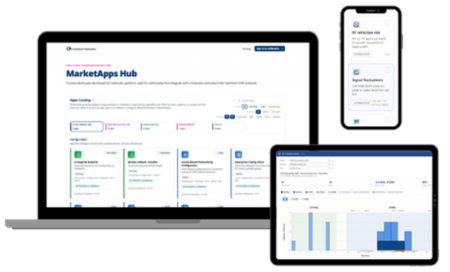
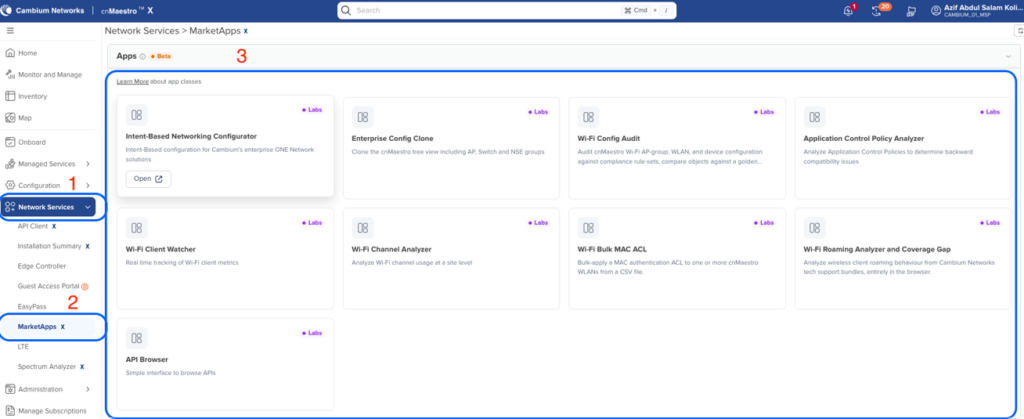
The Cambium MarketApps Hub is what happens when you take those conversations seriously and pair them with modern AI-assisted development and deep integration into cnMaestro™. It is not a single tool. It is a platform and a home for purpose-built apps like the IBN Configurator and the Property Owner Dashboard, designed to turn customer requirements into working solutions faster than a traditional release cycle ever could.
Think about how most enterprises run their business applications. ERP, marketing, sales: every one of those platforms bends to fit the company’s workflows. Network management has traditionally been different. Too often, the network team has to adapt its processes to whatever the vendor has already defined.
Cambium’s intelligent application platform changes this story. With MarketApps, the network becomes programmable around each customer’s workflows, not the other way around.
The vision is simple: make deployments simpler to configure, easier to monitor, and faster to troubleshoot, so our customers can run their operations more efficiently. Here is how we are starting to do that.
Three Classes of Apps, One Platform
The apps on the MarketApps Hub fall into three classes, each aimed at a different kind of need. Here is an example of what each one can do.
Network efficiency, reliability, and analytics apps. These improve how the network itself is built and maintained. The IBN Configurator and the Wi-Fi Config Audit tool, both covered below, live here.
IT process apps. These streamline the operational workflows around the network, like the Installer app, which structures how field technicians deploy and validate sites.
Business process apps. These serve the business running on top of the network. The MDU apps, including the Property Owner Dashboard covered below, are the first examples, with IoT apps and guest access voucher apps on the way.
What makes this especially useful is that creating and maintaining these apps does not have to be a major development effort. That means customization can go beyond a broad vertical or use case and address the needs of an individual customer. That is what it means to make the network programmable.
The Problem We Kept Hearing
Talk to enough network admins and a pattern emerges. Most of them work across multiple vendor management systems, and every one of those systems exposes a different set of configuration knobs. That means the quality and consistency of a deployment can depend heavily on the person doing the work. Two sites solving the exact same problem can end up configured completely differently, simply because two different people built them.
Cambium has a best practice guide for MDU deployments. It is thorough, and it is also dozens of pages long. Expecting every admin to read it cover to cover and apply it correctly, every time, on every site, is not realistic. The knowledge exists. The problem is getting it into every configuration, consistently, without requiring every admin to become a Cambium expert first.
The Solution: Intent-Based Networking Configurator
So instead of asking admins to read a lengthy guide and manually translate it into configuration, we built the IBN Configurator to do the translation for them.
The admin answers a handful of questions about the site. Based on those answers, the Configurator automatically generates the NSE, switch, and AP profiles and groups, applying the recommended best practice configuration for that type of MDU deployment. No manual interpretation, no guesswork, no dependence on whether this particular admin happens to know the guide by heart.
Why does this matter? Consistency and accessibility. Anyone on the network team, regardless of experience level, can now produce a configuration that follows Cambium’s recommended best practice for MDU. Instead of relying on one person’s experience or memory, the team has a repeatable process it can use from site to site.
Fixing What Is Already Deployed: Wi-Fi Config Audit
New deployments are only half the story. What about the networks already in production, built over years by different admins with different habits?
That is where the Wi-Fi Config Audit tool comes in. It compares the current configuration against Cambium’s recommended configuration and surfaces every deviation. And it does not stop at reporting. Each deviation comes with a “Fix Now” option, so remediation is one click instead of a manual change window.
If a customer has their own configuration standard, the tool works the same way: it audits against the customer’s own template and offers the same one-click fix. Whether the baseline is Cambium’s or yours, drift gets found and fixed fast.
The point is simple: give customers an easier path to a well-configured network, whether it was deployed yesterday or three years ago.
Visibility for Everyone: The cnMaestro Property Owner Dashboard
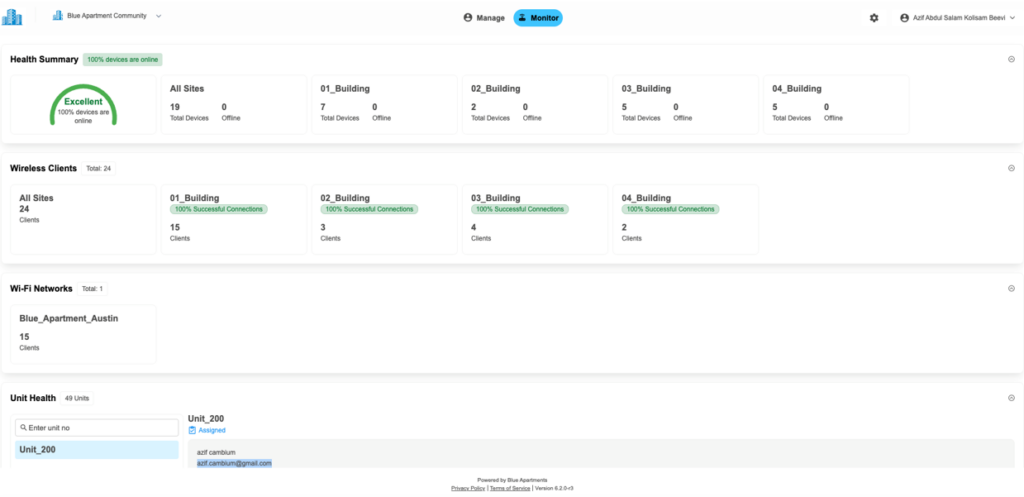
Configuration is one side of operational efficiency. The other side is visibility, and not just for the network team. Property owners have a stake in these networks too, and they should not have to be network experts to understand how their property is doing. The Property Owner Dashboard was built exactly for that person, around four KPIs.
1. Building Health Summary. The dashboard answers the question a novice user actually has: is everything okay? It shows how many devices are online and offline across the property and rolls that up into a health status per building. Building names are fully customizable, so instead of a generic device ID, the owner sees Building A, The Manor, Tower 2, whatever matches how they think about their property. They see the property the way they know it, not as a collection of network devices.
2. Wireless Connectivity Score per Building. Once an owner knows a building is healthy, the next question is how good the wireless actually is. We translate that into a simple score: 100%, 75%, or 50% successful connections per building. No RF jargon, no signal-to-noise ratios. Just a number that tells the owner where things are working well and where to pay attention.
3. Client Visibility Across Wireless Networks. A property typically runs several wireless networks: one for residents, one for guests, one for staff, maybe one for a specific amenity. The dashboard shows client connections across all of them, so usage across the whole property is visible in one place instead of hidden in silos, one SSID at a time.
4. Unit Health: Vacant or Occupied. At the unit level, the dashboard shows whether each unit is vacant or occupied, which is valuable for operational planning on its own. But this is just the starting point. In the next phase, we are extending unit-level visibility to device and wireless health, so an owner will be able to see not just whether a unit is occupied, but whether the wireless is actually working inside that specific unit.
Where This Is Going
Every app in the MarketApps Hub follows the same pattern: learn from the people doing the work, encode that knowledge into a tool, and integrate it directly into cnMaestro so it fits the workflow customers already have. The IBN Configurator makes best practice the default. Config Audit keeps it that way. The Property Owner Dashboard opens visibility to stakeholders who were never served by traditional network management.
That is the promise of the MarketApps Hub: a programmable network that adapts to each customer’s workflows, with more of the expertise built into the tools themselves. That makes the network easier to deploy, operate and understand without expecting every person who touches it to become a network expert.
Learn more about the Cambium MarketApps Hub and cnMaestro at cambiumnetworks.com.